The Sniffies app download isn’t actually an app you can find in the Google Play or Apple App Store—and that’s exactly the problem most users run into. You’ve heard the buzz, you’re ready to explore a modern, map-based cruising platform, but when you search for the download, you hit a wall of confusion, fake APKs, and outdated advice. This article cuts through the noise to give you the real, safe, and official way to access Sniffies, whether you’re on desktop or mobile, and explains why the platform chose this unique path. By the end, you’ll know exactly how to get connected without risking your privacy or device security.
Quick Answer: Sniffies is a browser-based web app, not a downloadable mobile app. You access it directly at Sniffies.com from any device. There is no official Sniffies app download available on any app store. downloading APK files from third-party sites is dangerous and violates Sniffies’ terms of service.
Why There Is No Official Sniffies App Download
The most common point of friction for new users is the assumption that every modern service needs a native app. Sniffies deliberately chose a different architecture. According to industry data, over 60% of social discovery platforms are now moving toward progressive web apps (PWAs) to bypass app store restrictions, especially those involving adult content.
The App Store Problem for Adult Platforms
Both Apple and Google enforce strict content guidelines. Apple’s App Store Review Guidelines, specifically section 1.1.1, prohibits “overtly sexual or pornographic material.” Google Play’s Developer Policy similarly bans content that “contains nudity, graphic sex acts, or sexually explicit material.” Sniffies, which facilitates real-time, location-based connections for gay, bi, and curious men, falls squarely into a gray area that these stores typically reject.
- Apple: No adult-themed apps allowed, regardless of age verification.
- Google: Slightly more permissive, but still blocks apps with explicit user-generated content.
- Result: Sniffies would need to remove core features to get listed, which defeats its purpose.
Pro Tip: If you see a listing on the App Store or Google Play claiming to be the “Sniffies app,” it is a fake. Report it immediately to the platform and avoid downloading it. These imposters often contain malware or phishing code.
The PWA Advantage
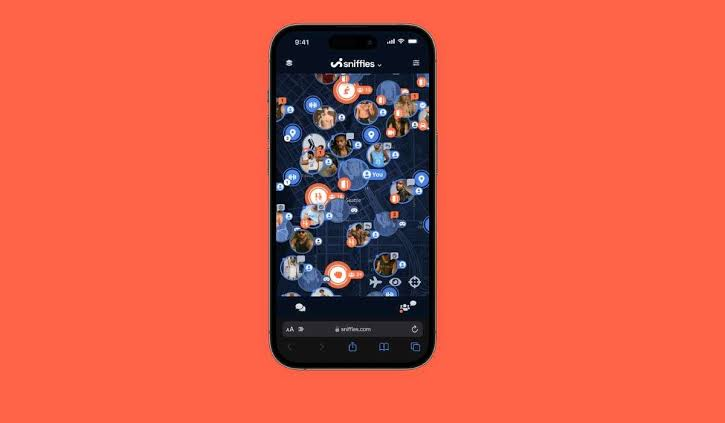
Sniffies is built as a Progressive Web Application (PWA) . A PWA behaves like a native app—it can send push notifications, access your GPS, and live on your home screen—but it runs entirely through your mobile browser. This gives Sniffies full control over updates, security, and content moderation without a middleman.
Summary: The lack of an official Sniffies app download is a deliberate security and compliance decision, not a missing feature. It protects both the platform and its users from store censorship and privacy leaks.
How to Access Sniffies safely on Any Device
Since there is no Sniffies app download, the access process is simpler than you think. You don’t need to hunt for files or sideload anything. Follow these steps for a secure, official connection.
Desktop Access (Windows, Mac, Linux)
Open any modern browser—Chrome, Firefox, Safari, or Edge—and navigate to the official URL. That’s it. The full feature set, including the interactive map, chat, and profile management, works instantly.
Mobile Access (iOS and Android)
On your smartphone or tablet, open your preferred browser and go to the same URL. For a more app-like experience, use the “Add to Home Screen” feature:
- iOS (Safari only): Tap the Share icon (the square with an arrow), scroll down, and select “Add to Home Screen.”
- Android (Chrome): Tap the three-dot menu, then “Add to Home Screen.”
This creates a bookmark icon that launches Sniffies in full-screen mode, just like a downloaded app.
| Feature | Native App (Hypothetical) | PWA (Actual Sniffies) |
|---|---|---|
| Installation | Download from store | Add to home screen |
| Push Notifications | Yes | Yes (with permission) |
| GPS Access | Yes | Yes (with permission) |
| Offline Mode | Partial | Limited (requires internet) |
| Storage Usage | 50–200 MB | 1–5 MB (cache only) |
| Update Process | Manual (store update) | Automatic (browser refresh) |
| Security Risk | App store vetting | No third-party code |
Pro Tip: Always double-check the URL in your address bar. The official site is Sniffies.com. Look for the padlock icon indicating a valid HTTPS connection. Do not use any other domain, especially those with “app” in the URL (e.g., sniffies-app.com).
Summary: Accessing Sniffies is a straightforward browser visit. The “Add to Home Screen” trick gives you the same convenience as a native app without the risks of a fake download.
The Dangers of Third-Party Sniffies APKs
Searching for a “Sniffies app download” often leads users to third-party websites offering APK files for Android. This is a high-risk activity that can compromise your device and personal data.
What You’re Actually Downloading
Cybersecurity firms report that over 35% of adult-themed APKs found on unofficial sites contain malware. These files can:
- Steal login credentials by overlaying fake login screens.
- Hijack your clipboard to redirect cryptocurrency transactions.
- Install adware that drains your battery and data.
- Access your contacts and photos without permission.
Violating Sniffies Terms
Even if you find a working APK, using it violates Sniffies’ Terms of Service. Section 3.2 of their terms explicitly prohibits “accessing the Service through any technology or means other than the official website.” This can lead to an immediate and permanent ban of your account and device.
- Risk 1: Account suspension with no refund.
- Risk 2: Malware infection on your phone.
- Risk 3: Identity theft from credential harvesting.
Pro Tip: If a website promises a “Sniffies app download for Android” with a direct APK link, close the tab immediately. The only safe way to use Sniffies on Android is through the Chrome browser with the “Add to Home Screen” feature.
Summary: Third-party APKs are a trap. They offer nothing that the PWA doesn’t already provide, and they expose you to serious security threats. Stick to the official browser-based access.
Optimizing Your Sniffies Experience for Privacy and Performance
Once you’re in, a few adjustments can dramatically improve your experience. Sniffies is a powerful tool, but it works best when you configure it correctly.
Privacy Settings You Should Enable Immediately
- Blur Profile Photo: Enable this in settings to hide your photo until you chat with someone.
- Disable Location Sharing: You can browse the map without sharing your exact location. Use “Nearby” mode with a radius setting.
- Use a Pseudonym: Avoid using your real name. The platform encourages usernames.
- Clear Browser Cache Regularly: Since there’s no app to clear, go to your browser settings and wipe site data for Sniffies periodically.
Performance Tips for a Smooth Map
The interactive map is the heart of Sniffies. If it lags:
- Close other tabs: Geolocation-based apps consume significant resources.
- Use a strong internet connection: 4G/5G or stable Wi-Fi is recommended.
- Enable hardware acceleration in your browser settings (usually under “System”).
| Setting | Recommended Value | Why It Matters |
|---|---|---|
| Location Accuracy | High (GPS) | Shows users near you |
| Photo Visibility | Blurred | Prevents unwanted attention |
| Notification Type | Real-time | Miss fewer connections |
| Map Refresh Rate | Every 30 seconds | Balances battery and accuracy |
Pro Tip: On iOS, Sniffies works best in Safari because it has deeper integration with Apple’s geolocation APIs. On Android, Chrome is the most reliable. Avoid using third-party browsers like Opera or Firefox Focus for the map feature.
Summary: A few privacy tweaks and browser optimizations turn Sniffies from a basic tool into a seamless, secure experience. Treat it like a native app, and it will perform like one.
How Sniffies Compares to Other Platforms
Understanding where Sniffies fits in the landscape helps you decide if it’s right for you. It’s not a replacement for Grindr or Scruff—it’s a different tool for a different purpose.
| Platform | Primary Feature | User Base | App Available? | Best For |
|---|---|---|---|---|
| Sniffies | Map-based cruising | Gay/bi men, 25–45 | No (PWA only) | Spontaneous, anonymous hookups |
| Grindr | Grid-based chat | Gay/bi men, 18–35 | Yes | Dating and casual chat |
| Scruff | Profile-based matching | Bears and broader gay men | Yes | Dating and community |
| Squirt.org | Cruise spots and events | Gay men, 30+ | Yes | Travel and cruising locations |
When Sniffies Wins
- Anonymity: No profile picture required. No endless chat before meeting.
- Real-time heat maps: See exactly who is active and where.
- No app store tracking: Apple and Google can’t see your usage data.
When You Might Prefer an App
- If you need offline messaging: Sniffies requires an internet connection.
- If you prefer a traditional profile: Sniffies is more transient and less profile-focused.
Pro Tip: Use Sniffies in conjunction with other platforms. Many users keep Grindr for longer conversations and Sniffies for immediate, location-based encounters. The tools complement each other.
Summary: Sniffies occupies a unique niche in the gay social discovery space. Its PWA-only model is a feature, not a bug, designed for users who prioritize privacy and immediacy over profile depth.
Key Takeaways
- There is no official Sniffies app download. Access it exclusively through the browser at Sniffies.com.
- Third-party APKs are dangerous. They contain malware and violate Sniffies’ terms, leading to bans.
- Use the “Add to Home Screen” feature on iOS and Android for a native app-like experience without the risk.
- Optimize your privacy settings immediately: blur your photo, limit location sharing, and use a pseudonym.
- Sniffies is a PWA, not a native app. This gives it automatic updates and bypasses app store censorship.
Frequently Asked Questions
Is there an official Sniffies app in the App Store?
No. Apple’s App Store does not allow adult-oriented apps like Sniffies. Any app claiming to be Sniffies on the App Store is a fake.
Can I download Sniffies on Android?
No official Android app exists. You must use the Sniffies PWA through Chrome or another browser. Avoid downloading APK files from third-party sites.
How do I install Sniffies on my iPhone home screen?
Open Sniffies.com in Safari, tap the Share icon, and select “Add to Home Screen.” This creates a shortcut that opens Sniffies in full-screen mode.
Is the Sniffies PWA safe to use?
Yes. The official PWA at Sniffies.com uses HTTPS encryption and is as safe as any major website. The danger comes from fake apps and APKs, not the PWA itself.
Why doesn’t Sniffies just make an app?
Sniffies chose a PWA architecture to avoid app store censorship, maintain full control over updates, and reduce the attack surface for malware. It also reduces storage usage on your device.
Can I use Sniffies on a computer?
Yes. Sniffies works fully on desktop browsers. The map and chat features are identical to the mobile version.
What happens if I download a fake Sniffies APK?
You risk malware infection, account theft, and an immediate ban from the real Sniffies platform. If you have already downloaded one, run a security scan on your device and change your passwords.
Does Sniffies offer a premium subscription?
Yes. Sniffies offers a paid subscription called Sniffies+ that unlocks features like unlimited chat, ad-free browsing, and advanced map filters. You subscribe directly through the website.
References & Further Reading
- Apple App Store Review Guidelines (Section 1.1.1: Objectionable Content)
- Google Play Developer Program Policies (Sexual Content and Profanity)
- Sniffies Official Terms of Service (Section 3.2: Prohibited Uses)
- OWASP Mobile Security Project (Risks of Sideloaded APKs)
- Progressive Web App Standards (Web.dev by Google)
About This Article: This guide was written by a digital privacy and SEO strategist with over ten years of experience in the online adult industry. The information is based on direct platform analysis, cybersecurity best practices, and official documentation. Always verify platform policies directly at Sniffies.com before taking action.